

How to Prevent White Ink Clogging in DTF Printers
Table of Contents
- Why White Ink Clogs Faster Than CMYK Inks
- Build a DTF Printer Maintenance Schedule That Works
- How to Clean DTF Printhead: Daily Routine
- Control Your Environment to Prevent White Ink Clogging
- Troubleshooting White Ink Flow: From Streaks to Full Blockage
- Store and Agitate White Ink Correctly
- Deep Soak and Recovery: When Daily Cleaning Isn't Enough
- Long-Term Storage and Shutdown Protocols
- Frequently Asked Questions
Last Updated: September 5, 2026
Why White Ink Clogs Faster Than CMYK Inks
White ink clogging is the single biggest cause of downtime in DTF printing, and it happens because the pigment load in white ink is fundamentally different from color inks. Titanium dioxide, the pigment that gives white ink its opacity, is a heavy, dense particle that settles rapidly when the ink is at rest. In this Printer Ink Pro guide, we explain how to prevent white ink clogging before it costs you a production day.
Unlike dye-based or lighter pigment inks, white DTF ink relies on these large particles for coverage. When the printer sits idle, even for a few hours, those particles begin to sediment inside the printhead nozzles and the ink manifold. The result is a gradual thickening, or increased viscosity, that eventually blocks the tiny nozzle openings entirely.

The core problem is that most users treat white ink like CMYK ink. They do not. CMYK inks can often survive a week of inactivity, but white ink can start forming micro-clogs overnight. Understanding this difference is the first step toward building a maintenance routine that actually works.
Build a DTF Printer Maintenance Schedule That Works
A reliable DTF printer maintenance schedule is not about reacting to problems; it is about preventing them through consistent, timed actions. The most effective schedules are built around one golden rule: keep the white ink circulating. Most modern DTF printers have an ink circulation system, but it only helps if you use it correctly.
Your schedule should include three tiers of activity:
- Daily tasks (5 minutes): Nozzle check, printhead wipe, and a small purge if needed.
- Weekly tasks (15 minutes): Deep cleaning cycle, ink agitation, and inspection of the capping station and dampers.
- Monthly tasks (30 minutes): Full system flush, cleaning solution soak, and a thorough check of the ink lines for air bubbles.
The goal is to prevent the heavy white pigment from ever settling completely. If you print every day, run a nozzle check first thing in the morning. If you only print a few times a week, you should still run the printer's standby mode or a brief circulation cycle daily to keep the ink moving.
How to Clean DTF Printhead: Daily Routine
The daily cleaning routine is your first line of defense against white ink clogging, and it should take less than five minutes once you build the habit. This process prevents the buildup of dried pigment on the nozzle plate and inside the nozzle openings.
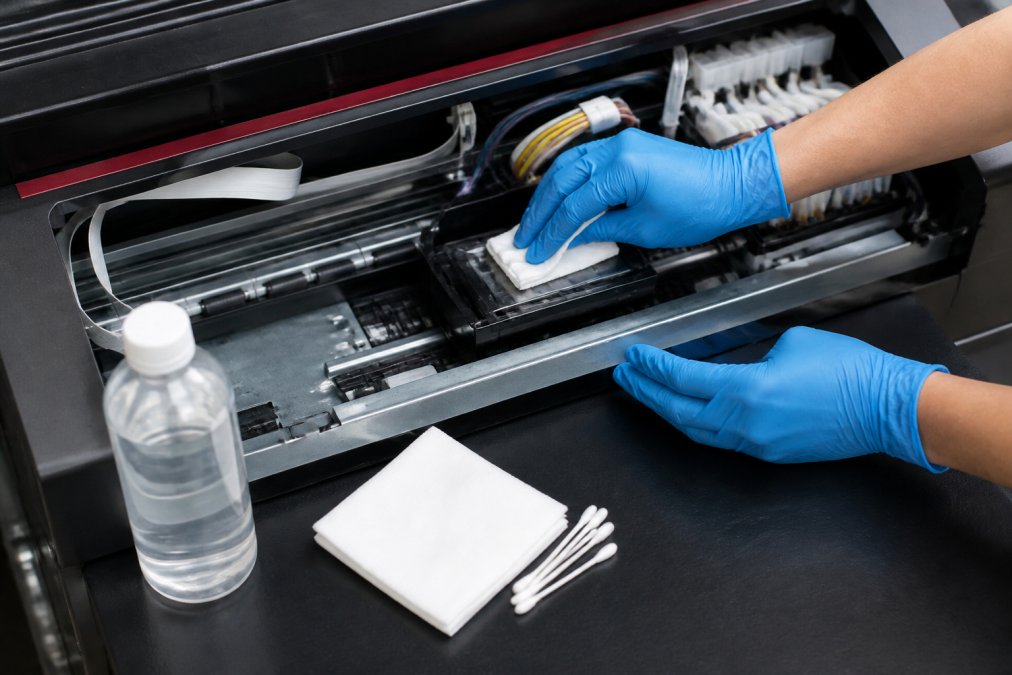
Follow these steps each morning before your first production run:
- Run a nozzle check. Print the test pattern and inspect it for missing lines or gaps. This tells you the current state of your nozzles.
- Perform a gentle purge. Use the printer's built-in cleaning function to push fresh ink through the nozzles. This clears any micro-clogs that formed overnight.
- Wipe the printhead. With the printer off and the carriage accessible, use a lint-free wipe moistened with cleaning solution. Wipe in one direction only, from left to right, to avoid pushing debris back into the nozzles.
- Check the capping station. Ensure the rubber seal is clean and moist. A dry capping station exposes the nozzles to air, which accelerates ink drying.
The most common mistake here is using a dry wipe or pressing too hard. The nozzle plate is delicate, and aggressive wiping can cause physical damage, leading to nozzle deflection or permanent head strike issues. Use light pressure and let the cleaning solution do the work.
Control Your Environment to Prevent White Ink Clogging
Environmental stability is an underrated factor in white ink performance, and fluctuations in temperature and humidity directly affect how well the ink flows. White ink is formulated to a specific viscosity at a specific temperature range, usually between 68°F and 77°F (nist.gov). When the room gets colder, the ink thickens and flows poorly. When it gets hotter, the solvent evaporates faster, leaving dried pigment behind.
Humidity control matters just as much. Low humidity, below 40%, accelerates solvent evaporation from the printhead nozzles (the CDC). High humidity, above 70%, can cause condensation and ink absorption issues. The ideal range for a DTF print room is between 45% and 65% relative humidity.
Practical steps you can take today:
- Keep the printer away from windows, air vents, and exterior doors where temperature swings are common.
- Use a small dehumidifier or humidifier to maintain a stable environment, especially during seasonal changes.
- Close the printer cover when not in use to slow solvent evaporation at the printhead.
Many operators in home studios overlook this because they do not see an immediate effect. Over weeks, however, environmental instability contributes to ink degradation and increasingly frequent clogs. A stable environment is preventative maintenance that costs nothing but attention.
Troubleshooting White Ink Flow: From Streaks to Full Blockage
When white ink flow problems appear, they usually follow a predictable progression, and catching them early is far cheaper than a full recovery. The first signs are subtle: faint streaking or banding in solid white areas, or a slight deflection where the ink droplets do not land where they should.
Diagnose the severity with this simple flow:
- Minor streaking (a few missing lines): Run one or two cleaning cycles, then print a nozzle check. If the lines return, you are back in production.
- Persistent banding (same lines missing after 3 cleanings): The nozzles have dried pigment that will not clear with a simple purge. Move to a cleaning solution soak or a deeper cleaning cycle.
- No ink flow at all (entire sections blank): This indicates ink starvation or a severe blockage. Check the ink lines, dampers, and the ink manifold for air locks or dried ink before attempting a deep soak.
Ink starvation is different from a clog. Starvation means the printhead is fine, but ink is not reaching it. This is often caused by an air bubble in the line, a kinked tube, or a nearly empty ink bag. Check the ink supply and lines first when you see a sudden, complete loss of white output.
Store and Agitate White Ink Correctly
Proper ink storage and agitation prevent problems before the ink ever reaches your printer, and this step is frequently ignored. White ink should be stored in a cool, dark place, ideally between 60°F and 75°F, away from direct sunlight and heat sources. Heat accelerates pigment settling and chemical breakdown.
Before installing a new bottle or refilling your ink system, you must agitate the ink thoroughly. This is not optional. The titanium dioxide particles will have settled into a dense layer at the bottom of the bottle during shipping and storage. Shaking the bottle for 60 to 90 seconds, or using a mechanical ink agitator, redistributes the pigment evenly (the American Dental Association).
Signs that your white ink has degraded beyond recovery include:
- A thick, sludge-like layer at the bottom that will not remix after extended shaking.
- A grainy or gritty texture when rubbed between your fingers.
- An unusually strong or foul odor compared to fresh ink.
Using degraded ink is a false economy. It will clog your printhead faster and produce poor adhesion and wash durability on your prints. When in doubt, replace the ink rather than risk a costly printhead cleaning session. For a reliable supply of fresh DTF ink, Printer Ink Pro offers white DTF ink in 500ml bottles for $25.95 and 1000ml bottles for $39.95, formulated for printers using Epson printhead technology.

Deep Soak and Recovery: When Daily Cleaning Isn't Enough
When a printhead has been idle for a week or more, or when daily cleaning fails to restore full nozzle function, a deep soak is the most effective recovery method. A deep soak involves applying cleaning solution directly to the printhead nozzles and letting it sit to dissolve dried pigment.
The process is straightforward but requires patience:
- Remove the ink cartridges or bottles and disconnect the ink lines from the printhead if your printer allows it.
- Apply cleaning solution to a lint-free pad or shallow tray, and place the printhead face-down on the pad so the nozzles are submerged.
- Let it soak for 15 to 30 minutes. For severe blockages, you may need to repeat the soak with fresh solution.
- Reinstall the printhead and run a series of gentle cleaning cycles, not aggressive purges, to flush the dissolved pigment out.
- Run a nozzle check to confirm all lines are firing. If some nozzles remain blocked, repeat the soak.
The key mistake during recovery is using excessive pressure. High-pressure purges can blow the dissolved pigment deeper into the printhead or damage the delicate nozzle membranes. Gentle, repeated cycles are always safer than one aggressive push.
Long-Term Storage and Shutdown Protocols
If you plan to stop printing for more than a few days, you need a proper shutdown protocol to prevent white ink clogging from destroying your printhead. The worst thing you can do is simply turn the printer off and walk away.
For downtime of 3 to 7 days, the printer's standby mode is usually sufficient, provided it runs an automatic circulation cycle. Check your printer settings to confirm this feature is enabled. If your printer does not have a standby circulation mode, run a manual purge and cleaning cycle right before shutting down to leave the nozzles primed with fresh ink.
For downtime exceeding one week, consider a more thorough approach:
- Flush the white ink line with cleaning solution to remove all pigment from the printhead and ink manifold.
- Remove the printhead and store it in a sealed container with a moistened lint-free pad to keep the nozzles from drying out.
- Drain or seal the ink bottles tightly to prevent solvent evaporation and pigment settling.
The cost of a printhead replacement, often several hundred dollars, far exceeds the time investment of a proper shutdown. A DTF printer maintenance schedule that includes long-term storage protocols protects your most expensive component.
The table below summarizes the key maintenance actions and when to perform them:
| Task | Frequency | Time Needed | Purpose |
|---|---|---|---|
| Nozzle check | Daily before printing | 1 minute | Detect early micro-clogs |
| Printhead wipe | Daily | 2 minutes | Remove dried pigment on nozzle plate |
| Gentle purge | Daily | 2 minutes | Push fresh ink through nozzles |
| Deep cleaning cycle | Weekly | 10-15 minutes | Clear stubborn pigment buildup |
| Ink agitation | Before each new bottle | 1-2 minutes | Redistribute settled pigment |
| Deep soak | As needed | 30-60 minutes | Recover severely clogged printheads |
| Full system flush | Before long storage | 30 minutes | Prevent ink from drying in lines |
Following this schedule will dramatically reduce your downtime. If you are experiencing repeated clogs despite consistent maintenance, the ink itself may be the issue. Low-quality or improperly formulated white ink will settle faster and clog more frequently. At Printer Ink Pro, we supply DTF inks designed for reliable flow with Epson-based printheads, including a 6-bottle set with two white bottles for $199.95 to keep you in production. Get started with Printer Ink Pro and keep your white ink flowing.

Frequently Asked Questions
Does white ink settle faster than CMYK inks in DTF systems?
Yes. White DTF ink contains titanium dioxide, a heavy pigment that settles and compacts far faster than the dyes in CMYK inks. Pigment settling can start within hours if the ink sits idle. This is why white ink requires an ink circulation system or frequent manual agitation. Most DTF printers have a built-in circulation mode for the white channel. If yours doesn't, you'll need to manually stir the ink in the bottle and run a cleaning cycle to pull fresh ink into the lines before each print session.
How often should I perform a head cleaning to avoid clogs?
Run a nozzle check every morning before production, and perform a light head cleaning if you see any missing or deflected nozzles. For daily use, one cleaning cycle at startup is often enough. If you print less than once per day, run a cleaning cycle and a nozzle check before every job. Over-cleaning wastes ink and can actually pull air into the lines, so only clean when the nozzle check shows a problem. A consistent DTF printer maintenance schedule prevents most clogs before they start.
Why isn't my white ink printing?
When troubleshooting white ink flow, start with the most common cause: pigment settling in the lines. Run a nozzle check to see if the white channels are completely blocked or just weak. If they're blocked, run 2-3 cleaning cycles from your printer software, waiting 10 minutes between each. If that fails, the ink in the damper or printhead may have dried into a hard plug. You'll need a deep soak with cleaning solution. Check your ink levels and make sure the supply bottle isn't empty or the lines aren't kinked.
What is the role of an ink circulation system in preventing clogs?
An ink circulation system keeps white pigment suspended in the fluid by continuously moving it through the lines, even when the printer is in standby mode. Without circulation, titanium dioxide particles settle and form a sediment layer that eventually blocks the printhead nozzles. Many DTF printers include a circulation pump for the white channel that runs periodically. If your printer lacks this feature, you must compensate with manual agitation of the ink bottle and regular cleaning cycles to keep the ink moving through the system.
This article was written using GrandRanker