

How to Stop DTF Ink Clogging: 7 Prevention Steps
Table of Contents
- Why DTF Ink Clogs and What Causes It
- Set Up a DTF Printer Maintenance Schedule
- Maintain Your DTF White Ink Circulation System
- How to Perform a DTF Nozzle Check
- Clean Your Printhead Before Clogs Form
- Control Environmental Factors: Temperature and Humidity
- Choose High-Quality DTF Ink to Prevent Clogging
- Conclusion
Last Updated: August 28, 2026
Why DTF Ink Clogs and What Causes It
DTF ink clogging occurs when pigment particles, polymer buildup, or air bubbles block printhead nozzles, cutting off ink flow. Most clogging stems from three preventable factors: printer inactivity, improper ink quality, and neglected maintenance. When your DTF printer sits unused for days or weeks, white ink settles and pigment particles accumulate in dampers and ink lines, eventually blocking nozzles. Vapor lock, air bubbles that form when pressure fluctuates or ink dries at the nozzle plate, also blocks liquid flow. Low-quality or incompatible ink formulations that don't maintain proper viscosity compound the problem.

Nearly all clogging scenarios are preventable with consistent maintenance and the right supplies.
Set Up a DTF Printer Maintenance Schedule
A maintenance schedule prevents 80% of clogging issues before they start (peer-reviewed research). Your cycle should include four tiers: daily, weekly, monthly, and quarterly tasks.
Daily maintenance takes about five minutes and involves running a nozzle check to verify all color channels are firing correctly. This catches partial blockages before they become full clogs. Weekly maintenance includes checking your white ink circulation system to ensure the agitator is moving and inspecting the capping station to ensure it's making proper contact. Monthly tasks involve deeper inspection of ink lines and dampers for blockage signs, and replacing the maintenance tank if it's more than 75% full. Quarterly maintenance means performing a full printhead soak using recovery fluid if nozzle checks show persistent weakness.

Document your maintenance activities in a spreadsheet, recording the date, what you did, and observations like nozzle check results. This log becomes invaluable for troubleshooting because you'll see patterns, like white ink clogging consistently on the third week of inactivity.
Maintain Your DTF White Ink Circulation System
White ink circulation is critical because white ink contains heavy pigment particles suspended in a polymer base. Without active circulation, particles settle within days, creating sludge that clogs dampers and nozzles.
Most DTF printers include an automatic white ink circulation system with a motor-driven agitator inside the white cartridge that spins periodically to keep particles suspended. Monitor this system by listening for the faint whirring sound of the agitator motor during idle periods. If you don't hear it after 30 minutes, the circulation system may have failed. Check your printer's control panel for circulation status.
If circulation has stopped, manually trigger a circulation cycle through your printer's maintenance menu. Perform this every 12 hours if the automatic system isn't functioning. Check the tubing connecting the white cartridge to the damper assembly for cracks, kinks, or discoloration. Discolored tubing indicates dried ink residue that restricts flow. If tubing is compromised, replace it immediately. The ink sac inside the white cartridge can develop micro-tears over time, preventing proper ink flow. If white ink flows slowly or inconsistently, replace the sac. Printer Ink Pro offers replacement white ink cartridges with fresh sacs designed for Epson-based DTF systems.
How to Perform a DTF Nozzle Check
A nozzle check is your first diagnostic tool. Run one every morning before your first print job and immediately after any printer inactivity longer than 24 hours.
The nozzle check prints a pattern of vertical lines, one for each color channel. A healthy check shows complete, solid lines with no gaps. If you see breaks, missing colors, or weak output, you have a partial or complete blockage. Access the nozzle check through your printer's control panel or software, typically under Maintenance > Nozzle Check. Save the printout and compare it to previous checks.
If the nozzle check shows weakness, proceed immediately to a cleaning cycle. Start with a light cleaning, which takes about 2 minutes. Run another nozzle check. If output improves but isn't perfect, do a normal cleaning. If the light cleaning made no difference, jump to a deep cleaning. If three consecutive deep cleaning cycles don't restore a missing color channel, you likely have a physical blockage requiring manual intervention.
Clean Your Printhead Before Clogs Form
Preventative cleaning happens on a schedule before problems appear. Emergency cleaning happens after nozzle checks show weakness and often requires more aggressive measures.
For preventative cleaning, use your printer's light cleaning cycle once per week during regular use. This gentle cycle takes 2-3 minutes and uses minimal recovery fluid. If you print daily, weekly light cleaning is usually sufficient.
When manual cleaning is needed, power down the printer completely and wait 5 minutes for the capping station to release. Locate the printhead cartridge assembly and consult your printer's manual for removal procedures. Use a specialized DTF cleaning solution, not water or general-purpose solvents. Dip a soft, lint-free brush into the cleaning solution and gently brush the nozzle plate in one direction only. Work slowly for 5-10 minutes.
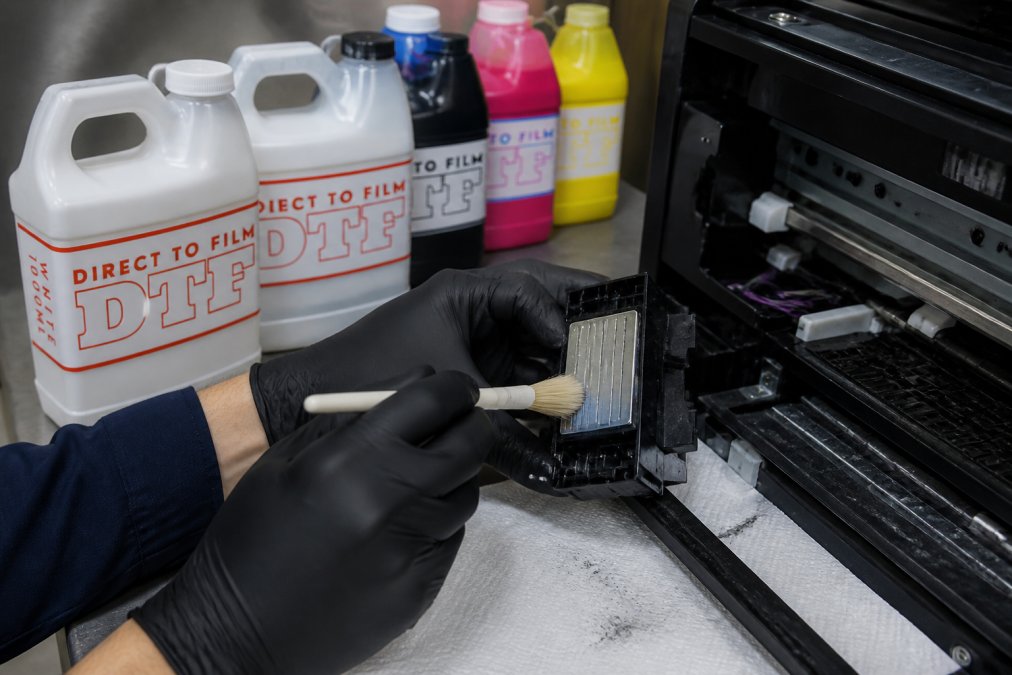
After brushing, use a clean, dry cloth to gently wipe away loosened ink and cleaning solution. For stubborn blockages, use a small syringe filled with cleaning solution to gently push fluid through ink delivery tubes, flushing out dried ink or air pockets. Insert the syringe tip into the ink line fitting and slowly push solution through. Do this gently; excessive pressure can damage internal seals.
Once cleaning is complete, reinstall the printhead and run a full circulation cycle before printing. Then run a nozzle check. You should see immediate improvement.
Control Environmental Factors: Temperature and Humidity
Your print shop's environment directly impacts DTF ink behavior. Ideal operating temperature is 68-72°F (20-22°C). Outside this range, ink viscosity changes. Too cold, and white ink becomes thick and sluggish. Too hot, and ink becomes thin, causing poor adhesion and premature drying at the nozzle plate.

Maintain humidity between 45-65% relative humidity (ashrae.org). DTF inks contain solvents that evaporate if humidity drops below 40%, causing premature drying and clogging. Humidity above 70% can cause condensation inside cartridges, introducing water into the ink system. Install a digital temperature and humidity monitor in your printer area. Check it daily and adjust your HVAC system or use a portable humidifier or dehumidifier as needed.
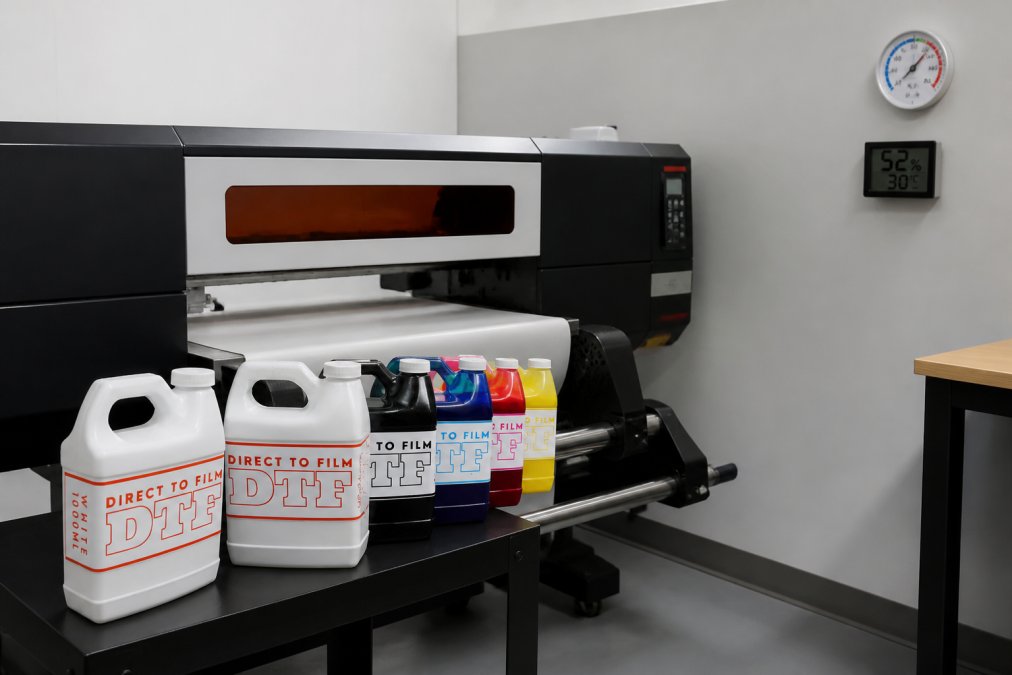
During winter months, heating systems dry out indoor air, often dropping humidity to 30-35%. Run a humidifier during heating season. Long-term storage of DTF printers (more than 2 weeks of inactivity) requires keeping the printer in a climate-controlled space at 50-60°F with 40-50% humidity. Before reactivating a stored printer, allow it to warm gradually to room temperature over 2-4 hours to prevent condensation.
Choose High-Quality DTF Ink to Prevent Clogging
Low-quality or improperly formulated inks are a major source of clogging. The cheapest ink often contains poorly suspended pigments that settle rapidly, inadequate polymer stabilizers, or incompatible solvents that don't flow correctly through your printer's damper system.
High-quality DTF ink maintains consistent viscosity across temperature ranges, keeps pigments suspended longer, and includes polymer chemistry formulated for your printer's damper and nozzle materials. When evaluating DTF ink, check the pigment loading, higher-quality inks typically have 8-12% pigment loading versus 4-6% in lower-quality formulations (peer-reviewed research). Verify the ink has been tested for compatibility with your specific printer model. DTF inks formulated for Epson printheads may not work correctly in Canon-based systems. Printer Ink Pro's DTF ink line is formulated specifically for Epson-based DTF systems, with polymer suspensions optimized for Epson damper chemistry. Our 6-bottle DTF ink kit includes 2 liters of white ink plus full CMYK, designed to minimize sedimentation and maintain consistent flow.
Buy from suppliers with quality control documentation. Reputable manufacturers test every batch for viscosity and sedimentation stability. Store DTF ink in a cool, dark place at 50-70°F. Avoid direct sunlight and extreme cold. Opened cartridges should be used within 6 months. If you're experiencing frequent clogging with existing ink, switching to higher-quality formulations often solves the problem entirely.
Conclusion
Stopping DTF ink clogging comes down to consistency. You need a maintenance schedule you'll follow, environmental conditions you'll monitor, and ink quality you'll invest in. The alternative, reactive emergency cleaning and unexpected downtime, costs far more in lost production time and premature printhead failure.
Printer Ink Pro specializes in DTF supplies engineered to work together. Our high-quality DTF inks are formulated specifically for Epson-based printers, with polymer suspensions that resist sedimentation and maintain proper viscosity throughout your print runs. Combined with a structured maintenance routine and proper environmental control, our inks help you achieve consistent, clog-free performance. Start with our 5-bottle DTF ink set to experience the difference quality makes, then build your maintenance routine around the schedule outlined above.
Prevent clogs before they happen. Most downtime is avoidable with the right approach to maintenance, environment, and supplies. Get started with Printer Ink Pro's DTF ink solutions and eliminate the guesswork from your printing workflow.
| Maintenance Task | Frequency | Time Required | Impact |
|---|---|---|---|
| Nozzle check | Daily | 2 minutes | Catches blockages early |
| White ink circulation check | Weekly | 3 minutes | Prevents sedimentation |
| Light cleaning cycle | Weekly | 2-3 minutes | Keeps nozzles clear |
| Capping station inspection | Weekly | 2 minutes | Prevents nozzle drying |
| Ink line inspection | Monthly | 5 minutes | Detects physical blockages |
| Maintenance tank replacement | Monthly | 3 minutes | Maintains system pressure |
| Printhead soak (if needed) | Quarterly | 6 hours | Removes stubborn deposits |
Frequently Asked Questions
How often should I perform a nozzle check on my DTF printer?
Run a nozzle check every 1-2 days if you print regularly, or before each shift in high-volume operations. A nozzle check reveals which nozzles are blocked before they cause visible print defects. If you notice missing lines or gaps in the test pattern, clean the printhead immediately. Skipping nozzle checks allows small blockages to worsen into full clogs that require aggressive soaking or syringing.
Does white DTF ink clog more easily than CMYK colors?
Yes. White DTF ink contains pigment particles that settle and thicken faster than standard color inks due to its higher viscosity and polymer content. This is why the white ink circulation system is critical, it keeps white ink moving through the dampers and nozzle plate to prevent sedimentation. Regular circulation cycles and frequent nozzle checks are especially important for white channels. High-quality white ink, like our DTF formulations, resists clogging better because the pigment particles remain suspended longer.
Should I leave my DTF printer on all the time to prevent clogs?
No. Leaving your printer on continuously wastes energy and can cause heat damage to electronics. Instead, use your printer's maintenance cycle feature before shutdown and after startup. A proper maintenance routine, including capping station sealing, printhead parking, and scheduled circulation, protects your nozzles during downtime. If you print daily, turning the printer on 30 minutes before work and running a nozzle check is sufficient. For multi-day breaks, perform a full cleaning cycle before powering down.
What is the best cleaning solution for DTF printheads?
Use a dedicated DTF cleaning solution or recovery fluid designed for your printer model. These are formulated to dissolve dried ink and polymer without damaging nozzle plates or dampers. Avoid generic solvents or water. For light clogs, use the printer's built-in cleaning cycle. For stubborn blockages, soak the printhead in recovery fluid for 15-30 minutes, then perform a nozzle check. Always refer to your printer's manual for approved solutions to avoid voiding warranty or causing damage.
This article was written using GrandRanker