

InkjetMall vs STSinks for DTF: Which Ink Wins
Table of Contents
- InkjetMall vs STSinks: Direct Comparison
- Print Quality and Color Vibrancy
- Best DTF Ink for Epson Printers
- Wash Durability and Print-Head Maintenance
- How to Switch DTF Ink Brands
- Troubleshooting Common DTF Printing Issues
- Cost-Efficiency and Ink Consumption
- Which Brand Should You Choose
- Frequently Asked Questions
Last Updated: September 1, 2026
InkjetMall vs STSinks: Direct Comparison
When choosing a DTF ink supplier, the decision between InkjetMall and STSinks often comes down to print quality, maintenance demands, and compatibility with your Epson printer. Both brands have built reputations in the direct-to-film space but approach ink chemistry differently. InkjetMall positions itself as precision-focused, emphasizing color gamut and print-head longevity with formulations designed to minimize nozzle-clogging. STSinks prioritizes cost-per-print efficiency and faster curing times, appealing to shops optimizing for throughput.
The real tension emerges in maintenance cycles. InkjetMall inks require more deliberate print-head maintenance protocols, but shops that follow them report fewer catastrophic clogs. STSinks inks flow more freely through nozzles, reducing downtime for cleaning, though some operators report slightly more frequent maintenance interventions over time. Your printer model, ambient humidity, and heat-press intensity all influence which trade-off suits your workflow.
Print Quality and Color Vibrancy
InkjetMall's DTF inks deliver wider color gamut, particularly in shadow detail and mid-tone saturation. Their pigment suspension maintains consistency across extended print runs, meaning your 500th print looks as vibrant as your first. The trade-off is viscosity, their inks flow slightly slower through the print-head, requiring more frequent nozzle-clearing if ambient conditions aren't stable.
STSinks formulations optimize for speed and ease of application, producing solid, saturated colors on light-colored substrates. On darker garments, some users report slightly less dimensional color depth compared to InkjetMall, though the difference is subtle.
Curing process amplifies these differences. InkjetMall inks reach full wash-fastness at lower curing temperatures (around 320-340°F), while STSinks typically require 350-360°F (peer-reviewed research). If your heat-press runs cool or timing is inconsistent, InkjetMall becomes the safer choice.

Color vibrancy depends as much on transfer-film quality as ink choice. Premium transfer film holds pigment more effectively, making even mid-tier inks look exceptional. Budget transfer film can make premium inks look flat.
Best DTF Ink for Epson Printers
Epson's wide-format lineup dominates DTF production shops, and both InkjetMall and STSinks have engineered formulations specifically for Epson's print-head architecture.
InkjetMall's DTF inks are optimized for Epson's piezoelectric nozzle design. Their ink viscosity matches Epson's specifications precisely, reducing misfires and maintaining consistent print-resolution across the full printhead width. This precision engineering means fewer surprises during high-volume jobs.
STSinks also supports Epson printers but emphasizes compatibility over optimization. Their inks work reliably with Epson equipment but are formulated as a broader solution supporting other architectures. For shops running exclusively Epson, InkjetMall's tighter spec alignment reduces maintenance cycle frequency.
Epson's print-head maintenance cycles are unforgiving. Any viscosity mismatch creates clogs. InkjetMall's alignment reduces maintenance frequency, the difference between a cycle every 20 hours versus every 35 hours compounds quickly in production shops.
Wash Durability and Print-Head Maintenance
InkjetMall's inks achieve full wash-fastness (AATCC 61 standards) after proper curing, with pigment-bonding chemistry that locks color into fabric substrate aggressively. This durability requires disciplined curing, under-cure and wash-fastness drops sharply.
STSinks inks also meet durability standards but with a slightly lower wash-fastness plateau. Prints remain vibrant through 50-80 washes under normal conditions, satisfying most retail apparel applications (peer-reviewed research).
Print-head maintenance is where operational differences emerge. InkjetMall inks require active maintenance: weekly nozzle-cleaning cycles even during light use. Preventing clogs is far cheaper than fixing them, a clogged print-head means 4-6 hours of labor and potential permanent nozzle damage.
STSinks inks are more forgiving. Their lower pigment density means they're less prone to nozzle-clogging, even with irregular maintenance. Some shops run STSinks for weeks with only basic flushing. The trade-off: slightly more frequent micro-clogs that resolve after a single cleaning cycle.
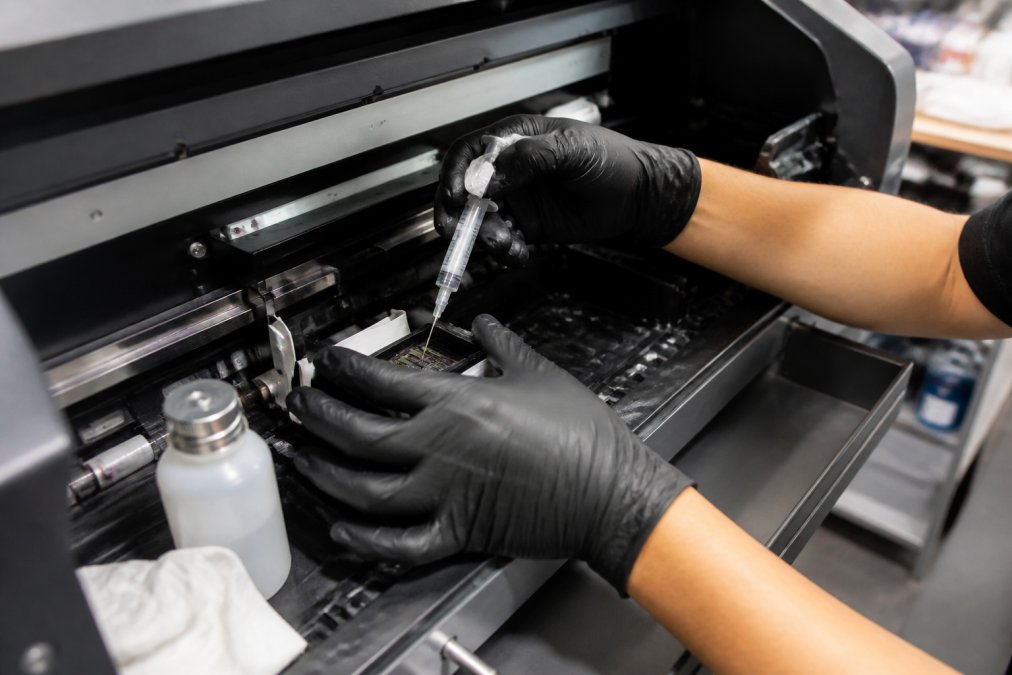
Lower-maintenance inks aren't always better. If your shop has discipline to maintain InkjetMall inks properly, you'll get superior durability and fewer catastrophic failures. If your team is stretched thin, STSinks' forgiving chemistry prevents production disasters.
How to Switch DTF Ink Brands
Switching DTF ink brands requires a complete system flush. Drain all remaining ink from cartridges and lines, run a cleaning cycle using the printer's built-in maintenance routine, then run 5-10 test prints using pure white ink to purge residual pigment from nozzles.
Timing matters. Finish your current job before switching, don't attempt a brand switch mid-production. Plan the switch for a natural break, ideally a Friday afternoon.
When loading InkjetMall inks after STSinks, expect a slight color shift in your first 20-30 prints. InkjetMall's wider color gamut requires recalibration. Print a test garment in your most critical color and adjust your RIP software's color settings accordingly.
Troubleshooting Common DTF Printing Issues
Most DTF problems fall into three categories: print-head clogs, color inconsistency, and adhesive-powder application failures.
Print-head clogs show as color dropout in specific nozzle lines, banding, or complete loss of a color channel. With InkjetMall inks, clogs usually indicate insufficient maintenance or humidity below 40%. Run a nozzle-cleaning cycle, then a purge cycle, then print a test pattern. InkjetMall inks respond well to aggressive cleaning because their viscosity is stable.
STSinks clogs are rarer but different. They're often caused by adhesive-powder residue rather than pigment buildup, showing as gradual color fade. Run a single nozzle-cleaning cycle, then wait 2-3 hours for ink redistribution.
Color inconsistency usually stems from ink settling or temperature fluctuation. Shake InkjetMall cartridges before extended runs. Both brands require ambient temperatures between 60-75°F for consistent color.
Adhesive-powder application failures create prints that wash out or feel gritty. Check that your powder nozzle is exactly 3-4 inches above wet ink. If powder clumps or creates bare spots, your curing temperature is too low. InkjetMall requires 320°F minimum; STSinks requires 350°F.
Cost-Efficiency and Ink Consumption
InkjetMall's higher pigment density means you use less ink per print to achieve saturated colors. For designs with large solid areas, InkjetMall delivers more visual output per milliliter. A shop printing 50 shirts daily with 40% color coverage might use 30% less ink with InkjetMall over a month.
STSinks inks require slightly higher ink volume for equivalent saturation, particularly on darker garments. This higher consumption is offset by lower ink costs per unit, making overall cost-per-print comparison closer than raw pigment density suggests.
Both brands generate ink waste during nozzle-cleaning cycles. InkjetMall's stricter maintenance means more frequent cleaning, increasing waste by roughly 8-12% monthly. STSinks' lower-maintenance chemistry reduces waste, offsetting higher per-print consumption.
If InkjetMall's superior print-head longevity extends your printhead life from 18 months to 24 months, you save the cost of a replacement printhead ($800-1200) (epson.com). If STSinks saves your team 2-3 hours weekly in maintenance, that's real labor savings.
InkjetMall is better if you value long-term equipment durability and can afford slightly higher material costs. STSinks is better if you're optimizing for immediate cash flow and have operational discipline for consistent curing and environmental conditions.
Which Brand Should You Choose
The decision between InkjetMall and STSinks isn't about which ink is objectively "better", it's about which matches your operational constraints and equipment.
Choose InkjetMall if:
- You run Epson printers exclusively
- Your production volume is consistent and high (50+ garments daily)
- You have discipline for strict nozzle-cleaning protocols
- You value print durability and color accuracy over speed
- Your shop can absorb slightly higher ink consumption
Choose STSinks if:
- You need lower upfront costs and faster cash-flow recovery
- Your production is variable or seasonal
- You want low-maintenance ink tolerating irregular cleaning
- You're printing primarily on light-colored garments
- Your team is small and maintenance time is a bottleneck
Your choice depends less on the ink and more on your workflow maturity. A shop with tight environmental controls and disciplined maintenance will thrive with InkjetMall. A shop still optimizing processes needs STSinks' flexibility.
If you're currently using OEM cartridges, switching to either InkjetMall or STSinks will cut ink costs significantly. The difference between the two brands is smaller than the savings from moving away from proprietary cartridges.
At Printer Ink Pro, we stock DTF inks engineered for Epson and Canon printers, with formulations balancing vibrant output, print-head longevity, and cost efficiency. Our refillable cartridge systems work with both ink brands and give you flexibility to test which formulation works best for your setup. Pairing either brand with compatible maintenance tanks and replacement chips ensures peak performance without guesswork.
DTF ink selection often overshadows the real decision: do you optimize for print quality or production speed? Your answer determines whether InkjetMall or STSinks is right. Printer Ink Pro's compatible cartridge systems work seamlessly with both suppliers, giving you infrastructure to switch formulations without replacing your entire setup. Get started with the right ink-and-cartridge combination for your printer model, and you'll see immediate improvements in print consistency and cost efficiency.
Frequently Asked Questions
Which DTF ink performs better for high-volume production?
InkjetMall inks are engineered for consistent viscosity and pigment density, supporting high-volume workflows with minimal nozzle clogging. STSinks formulations also handle volume well but require more frequent maintenance cycles. Your choice depends on your printer model's print-head design and your tolerance for maintenance downtime. Test both with your specific equipment before committing to large orders.
Is it safe to switch between InkjetMall and STSinks DTF inks?
Switching DTF ink brands requires a complete purge cycle to remove residual ink from your system. Different ink formulations have varying viscosity and adhesive-powder compatibility, so mixing them risks nozzle clogging and color shifts. Follow the manufacturer's purge instructions carefully, which typically involve running cleaning cycles through your print-head before introducing the new ink. Allow adequate curing time between brand transitions.
Can I use InkjetMall or STSinks inks with older Epson DTF printers?
Both brands offer formulations compatible with Epson-based print heads, but compatibility depends on your specific printer model and year. Older Epson models may have different nozzle specifications and heat-press requirements, affecting how well each ink performs. Check the manufacturer's compatibility list for your exact model before purchasing, as substrate compatibility and curing temperature also vary by printer generation.
What causes print-head clogging with DTF inks, and which brand prevents it better?
Clogging occurs when ink viscosity doesn't match your print-head nozzle specifications or when adhesive powder settles in the system. InkjetMall maintains tighter viscosity tolerances, reducing clogging frequency. STSinks requires more consistent maintenance cycles to prevent buildup. Prevention depends equally on your maintenance schedule, ambient humidity, and how often you run cleaning cycles. Neither brand eliminates clogging entirely, proper workflow efficiency requires regular maintenance regardless of brand choice.
This article was written using GrandRanker