

Best Refillable Cartridges for Epson Printers (2026)
Table of Contents
- Quick Comparison: Best Refillable Cartridges for Epson Printers
-
Top Refillable Cartridges for Epson Printers by Model
- Epson WorkForce WF-7210, WF-7710, WF-7720, $19.95
- Epson WorkForce WF-7110, WF-7610, WF-7620, $19.95
- Epson WorkForce WF-7010, WF-7510, WF-7520, $19.95
- Epson WorkForce Pro WF-7310, WF-7820, WF-7840, $29.95
- Epson Stylus Photo R2880 and R3000, $29.95-$49.95
- Epson SureColor P600, $49.95
- Epson Expression Photo XP-960, XP-970 and Stylus Photo 1400, $24.95
- Best Ink for Epson Refillable Cartridges: Dye vs. Pigment vs. Sublimation
- OEM vs. Refillable Cartridges: Cost Savings and Print Quality
- How to Refill Epson Ink Cartridges: Step-by-Step
- Troubleshooting Epson Refillable Cartridges: Clogs, Errors, and Chip Issues
- Long-Term Printer Health, Warranty, and Sustainability
- Which Refillable Cartridge Should You Pick?
Last Updated: August 23, 2026
Epson OEM ink cartridges are among the most expensive consumables in professional printing. For print shops, photographers, and sublimation businesses running high-volume jobs, refillable cartridges offer the most direct path to cutting costs without sacrificing print quality.

Refillable cartridges replace sealed OEM units with reservoirs you can top off using bulk ink. Done right, this approach delivers the same color output at a fraction of the cost-per-page. Below, we cover every major Epson model series, the right ink formulation for each use case, and how to keep your system running clean.
Quick Picks:
- Best for WorkForce wide-format: Printer Ink Pro WF-7210/7710/7720 cartridges at $19.95, auto-reset chip, four-color set
- Best for pro photo printing: Printer Ink Pro SureColor P600 cartridges at $49.95, nine-channel set with full auto-reset chip
- Best for sublimation conversion: Printer Ink Pro WF-7010/7510/7520 cartridges at $19.95, compatible with dye sublimation ink
Quick Comparison: Best Refillable Cartridges for Epson Printers
| Printer Series | Cartridge Set | Price | Chip Type | Ink Channels | Ink Compatibility |
|---|---|---|---|---|---|
| WF-7210, 7710, 7720 | T252XL | $19.95 | Auto-reset | 4 (CMYK) | Pigment, Dye, Sublimation, Eco Solvent |
| WF-7110, 7610, 7620 | T252XL | $19.95 | Auto-reset | 4 (CMYK) | Pigment, Dye, Sublimation, Eco Solvent |
| WF-7010, 7510, 7520 | T127XL | $19.95 | Auto-reset | 4 (CMYK) | Pigment, Dye, Sublimation, Eco Solvent |
| WF-7310, 7820, 7840 | T812XL | $29.95 | One-time-use | 4 (CMYK) | Pigment, Dye, Sublimation, Eco Solvent |
| Stylus Photo R2880 | T096 | $29.95 | Auto-reset | 9 | Pigment, Dye, Sublimation, Eco Solvent |
| Stylus Photo R3000 | T157 | $49.95 | Auto-reset | 9 | Pigment, Dye, Sublimation, Eco Solvent |
| SureColor P600 | T760 | $49.95 | Auto-reset | 9 | Pigment, Dye, Sublimation, Eco Solvent |
| XP-960, XP-970, Photo 1400 | T277 / T079 | $24.95 | Auto-reset | 6 | Pigment, Dye, Sublimation, Eco Solvent |
Top Refillable Cartridges for Epson Printers by Model
Compatibility is non-negotiable with refillable systems. The wrong cartridge series triggers non-genuine ink warnings, chip errors, and potential printhead damage. Every set below is matched exactly to its printer series.
Epson WorkForce WF-7210, WF-7710, WF-7720, $19.95
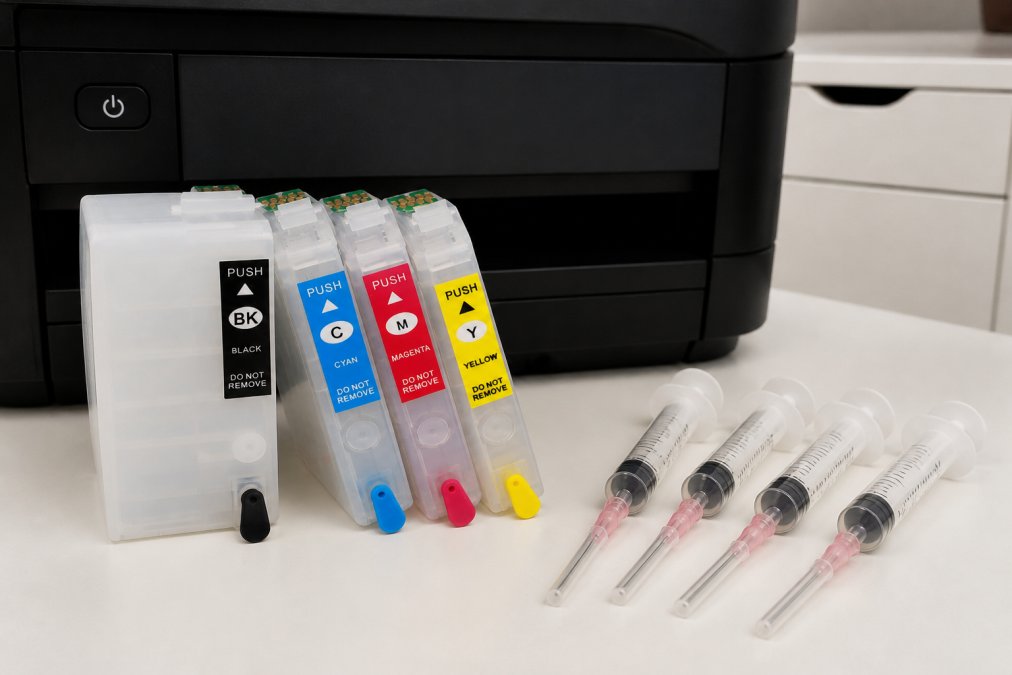
The Refillable Ink Cartridges for Epson WorkForce WF-7210 WF-7710 WF-7720 set uses T252XL cartridge numbers with auto-reset chips on all four colors. Reinstalling after a refill automatically resets the ink level indicator to full, no chip resetter tool required. The package includes four syringes plus Black T252XL120, Cyan T252XL220, Magenta T252XL320, and Yellow T252XL420 cartridges. These wide-format models support pigment ink, dye-based ink, dye sublimation ink, and water-based eco solvent ink.
Best for: Sublimation print shops and wide-format document printing businesses.
Epson WorkForce WF-7110, WF-7610, WF-7620, $19.95
The WF-7110/7610/7620 refillable set uses the same T252XL cartridge series, auto-reset chip system, and $19.95 price point. Confirm your exact model number before ordering, as chip firmware can differ between older and newer models.
Epson WorkForce WF-7010, WF-7510, WF-7520, $19.95
The older WF-7000 series uses T127XL cartridges rather than T252XL. The WF-7010/7510/7520 refillable set includes Black T127XL120, Cyan T127XL220, Magenta T127XL320, and Yellow T127XL420, all with auto-reset chips. These printers are popular sublimation conversion candidates and handle wide-format media cost-effectively.

Epson WorkForce Pro WF-7310, WF-7820, WF-7840, $29.95
The WF-7310/7820/7840 T812XL refillable set at $29.95 features a one-time-use chip rather than auto-reset. Once the chip signals empty, you'll need a replacement chip. Printer Ink Pro stocks replacement chips for this series.
Epson Stylus Photo R2880 and R3000, $29.95-$49.95
The R2880 refillable set at $29.95 covers all nine slots: Photo Black, Cyan, Magenta, Yellow, Light Cyan, Light Magenta, Light Black, Matte Black, and Light Light Black, with nine syringes included. The R3000 set at $49.95 mirrors this nine-channel structure using T157 cartridge numbers. Both carry auto-reset chips. For fine art photographers and print shops producing archival quality output, the expanded color gamut from a nine-channel system is essential.
Epson SureColor P600, $49.95
The P600 refillable set at $49.95 includes T760 series cartridges with all nine channels and auto-reset chips. OEM P600 cartridges are expensive. Switching to a refillable system with high-quality pigment ink produces comparable print resolution and color profile accuracy at a fraction of the ongoing cost.
Epson Expression Photo XP-960, XP-970 and Stylus Photo 1400, $24.95
Both the XP-960/XP-970 set and the Stylus Photo 1400 set are priced at $24.95 with six-channel configurations and auto-reset chips. The XP-960/970 uses T277 cartridges; the 1400 uses T079. These mid-range photo printers handle smooth gradients and skin tones well when paired with quality pigment or dye ink.
Best Ink for Epson Refillable Cartridges: Dye vs. Pigment vs. Sublimation
Choosing the right ink formulation is as important as choosing the right cartridge. The wrong ink causes print quality degradation, printhead clogging, and color profile mismatches.
Dye-based ink produces vivid colors and a wide color gamut, ideal for photo printing on glossy media and greeting cards. The trade-off is longevity: dye-based prints fade faster under UV light, making them unsuitable for archival work.
Pigment-based ink offers superior archival quality with prints lasting decades under normal display conditions. It performs better on matte and fine art papers but requires regular use and maintenance to prevent clogging. For the SureColor P600, R3000, and R2880, pigment ink is the standard choice.
Sublimation ink is a specialized dye-based formulation that transfers from paper to polyester fabric or coated substrates when heat is applied. All Printer Ink Pro cartridge sets support sublimation ink, making them practical for apparel decorators and promotional product businesses.
OEM vs. Refillable Cartridges: Cost Savings and Print Quality
OEM cartridges are engineered to Epson's exact specifications with ink formulations calibrated to each printer's printhead geometry. Auto-reset chips bypass non-genuine ink warnings cleanly.
The real argument for refillable systems is cost-per-page. OEM cartridges carry a significant per-milliliter premium. Bulk ink systems drop the per-page cost substantially, especially in high-volume environments.
Print quality with third-party ink depends entirely on formulation quality. A well-matched pigment or dye ink in a properly maintained refillable cartridge produces output indistinguishable from OEM results on most media types. Where OEM ink wins is in manufacturer-validated color profiles for fine art photographers doing precision color work.
Epson's warranty language states that using non-OEM ink may void coverage for printhead damage (epson.com). As documented in Epson's warranty policy for inkjet printers, damage attributed to third-party ink is typically excluded. In practice, the risk is manageable with proper maintenance.
How to Refill Epson Ink Cartridges: Step-by-Step
Refilling Epson ink cartridges takes about five minutes per cartridge once you've done it once.
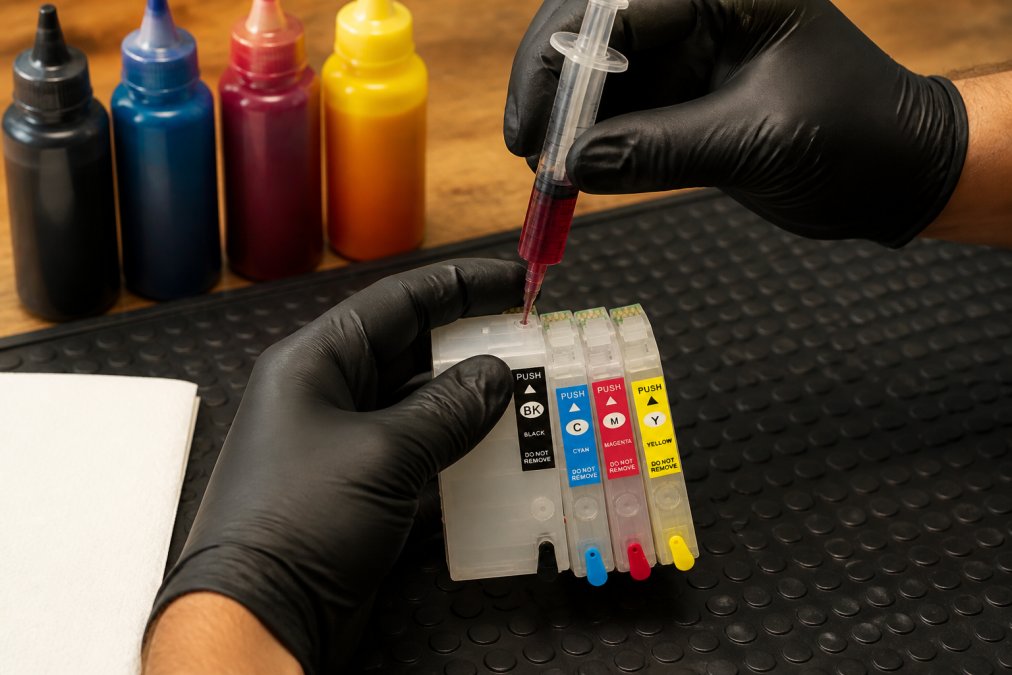
What you'll need:
- Refillable cartridge set (syringes included)
- Bulk ink in the correct formulation
- Nitrile gloves
- Paper towels or a protective mat
Steps:
- Remove the cartridge from the printer and place it on a protected surface.
- Locate the fill port on the top of the cartridge, typically covered by a small rubber plug.
- Draw ink into the syringe to the appropriate volume for that cartridge size.
- Insert the syringe needle gently into the fill port at a slight angle to avoid air lock.
- Inject ink slowly. Stop when resistance increases to avoid overfilling and leaks.
- Replace the rubber plug firmly and wipe the cartridge clean.
- Reinstall the cartridge. The auto-reset chip will register it as full on the next power cycle.
- Run a nozzle check to confirm all channels are firing correctly.
Injecting ink too fast introduces air bubbles and causes banding. Slow, steady pressure is the correct technique.
Auto-Reset Chips vs. One-Time-Use Chips
Auto-reset chips automatically report a full ink level each time the cartridge is removed and reinstalled. They work indefinitely across multiple refill cycles. All Printer Ink Pro sets except the WF-7310/7820/7840 use auto-reset chips.
One-time-use chips count down from full and stop functioning when empty. A replacement chip is required to continue using the cartridge. Printer Ink Pro stocks replacement chips for this series.
Troubleshooting Epson Refillable Cartridges: Clogs, Errors, and Chip Issues
Most refillable cartridge issues fall into three categories: printhead clogging, chip errors, and ink flow problems.
Printhead clogging is most common with pigment-based ink and white DTF ink. Run a nozzle check and cleaning cycle after any idle period longer than a week. For persistent clogs, a second cleaning cycle followed by a 30-minute rest resolves most cases. For severe blockages, a printhead soak with compatible cleaning solution is the next step.
Chip error messages on auto-reset chips are usually resolved by removing the cartridge, waiting 30 seconds, and reinstalling. If the error persists, clean the chip contacts with a cotton swab and isopropyl alcohol to clear oxidation.
Ink flow problems like streaking or missing colors are typically caused by air in the ink channel from an overfilled or improperly sealed cartridge. A standard cleaning cycle restores normal flow.
The waste ink pad fills over time with high-volume printing. Epson's firmware locks the printer when the pad reaches capacity. This is a separate hardware maintenance issue unrelated to refillable cartridges, but print shops should be aware that the waste ink pad counter will eventually need resetting on heavily used Epson printers.
Long-Term Printer Health, Warranty, and Sustainability
Ink viscosity and formulation quality directly affect printhead longevity. Quality-matched bulk ink formulated for the specific printhead type performs comparably to OEM ink in long-term wear tests. Generic, unformulated bulk ink is genuinely risky.
Epson's warranty terms follow the Magnuson-Moss Warranty Act guidelines, which prohibit manufacturers from voiding a warranty solely because an aftermarket part was used, unless the manufacturer demonstrates that the aftermarket part caused the specific damage. Using refillable cartridges with quality ink does not automatically void your entire printer warranty.
The sustainability case for refillable systems is straightforward. OEM cartridges generate plastic waste at every replacement cycle. A refillable cartridge used across hundreds of refill cycles eliminates the vast majority of that waste. For high-volume operations, the environmental impact reduction is substantial.
Which Refillable Cartridge Should You Pick?
The right choice depends on your printer model, ink formulation needs, and volume.
For WorkForce wide-format sublimation and document printing (WF-7010 through WF-7720): the $19.95 four-color auto-reset sets are the straightforward choice. They're compatible with sublimation ink, pigment ink, and dye ink.
For WorkForce Pro models (WF-7310, WF-7820, WF-7840): the $29.95 T812XL set with one-time-use chips is correct. Keep replacement chips in stock.
For professional photo printing (R2880, R3000, SureColor P600): the nine-channel sets at $29.95-$49.95 justify the higher cost through expanded color gamut and archival quality.
For mid-range photo printing (XP-960, XP-970, Stylus Photo 1400): the $24.95 six-channel auto-reset sets deliver solid photo output.
Verify your exact Epson model number before purchasing. The T252XL, T127XL, T812XL, T096, T157, T760, T277, and T079 series are not interchangeable.
| Use Case | Recommended Set | Price | Chip Type |
|---|---|---|---|
| Wide-format sublimation | WF-7210/7710/7720 or WF-7010/7510/7520 | $19.95 | Auto-reset |
| High-volume document printing | WF-7110/7610/7620 | $19.95 | Auto-reset |
| WorkForce Pro office printing | WF-7310/7820/7840 | $29.95 | One-time-use |
| Entry photo printing | XP-960/970, Photo 1400 | $24.95 | Auto-reset |
| Fine art / professional photo | R2880, R3000, SureColor P600 | $29.95-$49.95 | Auto-reset |
Keeping ink costs under control is one of the most practical ways a print shop can protect its margins. The wrong refillable system creates more problems than it solves. Printer Ink Pro stocks model-specific refillable cartridge sets for the full range of Epson WorkForce, Stylus Photo, Expression Photo, and SureColor printers, along with replacement chips, maintenance components, and compatible bulk ink in every formulation. Get started with Printer Ink Pro and cut your cost-per-page without compromising print quality or printhead longevity.
Frequently Asked Questions
Q: Are refillable ink cartridges worth it for Epson printers?
A: For most print shops and high-volume users, yes. OEM cartridges carry a high cost-per-page, while refillable cartridges with bulk ink dramatically lower that figure over time. The upfront cost of a refillable cartridge set for Epson printers starts at $19.95, and each subsequent refill costs only the price of bulk ink. If you print regularly, the savings compound quickly across dozens of refill cycles.
Q: Do refillable cartridges damage Epson printers?
A: Refillable cartridges do not inherently damage Epson printers when the ink formulation matches the printer's requirements. The main risks are printhead clogging from incompatible ink viscosity or using the wrong ink type for your application. Choosing cartridges with properly calibrated chips and using the correct ink, pigment-based, dye-based, or sublimation, for your specific printer model keeps the printhead and waste ink pad in good condition.
Q: What is the difference between auto-reset chips and one-time-use chips?
A: Auto-reset chips automatically register the cartridge as full each time you reinstall it after refilling, so you never need to manually reset or replace the chip. One-time-use chips, like those on the WF-7310, WF-7820, and WF-7840 cartridges, stop communicating after a set number of cycles and must be replaced with a new chip. Auto-reset chips are more convenient for high-volume printing; replacement chips for one-time-use models are available separately.
Q: Can I use third-party ink in my Epson printer without voiding the warranty?
A: Under the Magnuson-Moss Warranty Act, a manufacturer cannot void your warranty simply because you use third-party ink or refillable cartridges. They would need to prove the third-party product directly caused the damage. That said, using ink with incorrect viscosity or the wrong ink formulation for your printer model can cause real mechanical issues, so matching the ink type to your printer's specifications matters for both print quality and long-term reliability.
Q: How do I reset the chip on my Epson refillable cartridge?
A: For cartridges with auto-reset chips, no manual reset is needed, simply refill the cartridge and reinstall it, and the printer will read it as full. For one-time-use chips (such as those used in the WF-7310, WF-7820, and WF-7840 series), the chip must be physically replaced with a new replacement chip once it stops working.
This article was written using GrandRanker