

Dye Sublimation Ink vs Pigment Ink: 2026 Guide
Table of Contents
- Sublimation Ink vs Pigment Ink: Quick Comparison Table
- How Dye Sublimation Ink Works
- How Pigment Ink Works
- Color Vibrancy, Durability, and Substrate Compatibility
- Sublimation Ink vs Pigment Ink for T-Shirts
- How to Convert an Epson Printer to Sublimation
- Maintenance Requirements for Sublimation Printers
- Conclusion
Last Updated: August 25, 2026
Choosing the wrong ink type can destroy a production run, frustrate customers, and cost you hours of reprinting. At Printer Ink Pro, we work with apparel decorators, fine art photographers, and high-volume print shops daily, and the single most common source of preventable print failures comes down to one decision: dye sublimation ink vs pigment ink. This guide breaks down how each ink chemistry works, where each excels, and which one belongs in your printer for your specific substrate and workflow.

The short answer: sublimation ink is the clear winner for polyester textiles and coated hard goods; pigment ink wins on paper-based media and natural fiber substrates.
Sublimation Ink vs Pigment Ink: Quick Comparison Table
| Feature | Dye Sublimation Ink | Pigment Ink |
|---|---|---|
| Ink chemistry | Dye-based solution | Suspended pigment particles |
| Bonding method | Molecular bonding (infusion) | Surface adhesion |
| Best substrates | Polyester, coated hard goods | Paper, canvas, natural fibers |
| Color vibrancy | Exceptional saturation | Accurate, wide color gamut |
| Wash-fastness | Excellent (color infused into fiber) | Moderate (surface layer can degrade) |
| UV resistance | Good with UV-stable formulas | Excellent for archival quality |
| Drying/curing | Requires heat press (190-210°C) | Air-dry; no heat curing needed |
| Printhead risk | Low clogging risk | Higher clogging risk with pigment particles |
| Substrate limit | Fails on cotton and dark fabrics | Works on cotton, dark garments |
| Archival quality | Moderate | Industry-leading |
How Dye Sublimation Ink Works
Dye sublimation ink is a dye-based solution that converts from liquid to gas under heat without passing through a liquid phase. The gaseous dye molecules penetrate polyester fibers or polymer-coated substrates and bond at the molecular level, becoming permanently embedded in the material.
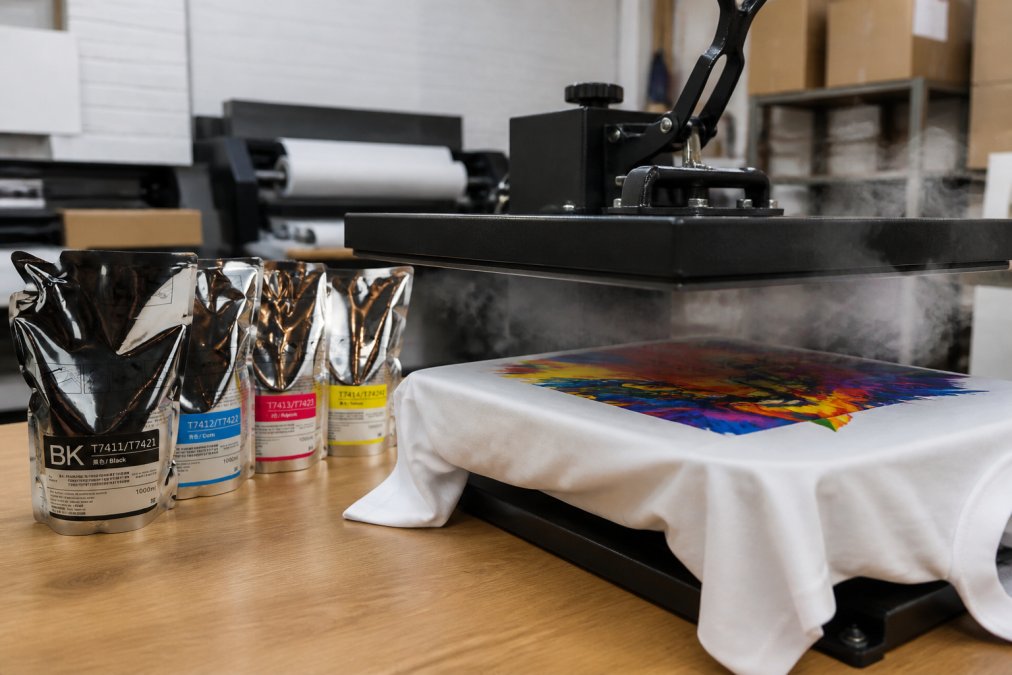
The color becomes part of the fiber structure, not a surface layer. The result is prints that won't crack, peel, or wash out under normal conditions.
The Heat Transfer and Molecular Bonding Process
The curing process requires a heat press set to approximately 190-210°C (375-410°F) for 45-60 seconds. During this thermal transfer window, the sublimation ink vaporizes and polyester fibers temporarily open their structure, accepting the dye molecules. When the press lifts and the substrate cools, the fibers close around the dye, locking it in permanently.
You cannot skip or rush the curing process. Undercured prints show washed-out color and poor wash-fastness. Overcured prints can scorch synthetic fibers. A calibrated heat press with consistent pressure and temperature is non-negotiable.
Substrate compatibility is equally strict. The molecular bonding process only works with polyester content of at least 65% (ideally 100%) or with polymer-coated hard goods like ceramic mugs, aluminum panels, and mousepads. On cotton or uncoated surfaces, the dye has nowhere to bond and the print will fade almost immediately.
How Pigment Ink Works
Pigment ink suspends microscopic solid pigment particles in a water-based or solvent-based carrier fluid. Unlike sublimation's dye-based solution, pigment ink does not infuse into the substrate. Instead, the pigment particles adhere to the surface after the carrier fluid evaporates or is absorbed.
This surface adhesion model gives pigment ink its archival quality on paper. According to Wilhelm Imaging Research on ink longevity standards, properly formulated pigment prints on archival media can maintain color fidelity for decades under display conditions.
Surface Adhesion and Archival Quality
Pigment ink's archival quality makes it the standard for fine art photography, museum-quality prints, and professional proofing. The wide color gamut handles subtle tonal gradations exceptionally well, critical for skin tones, shadow detail, and neutral grays.
The trade-off is printhead longevity. Pigment particles are larger than dye molecules, increasing the risk of nozzle clogging, especially in printers left idle for extended periods. Print shops running pigment ink need consistent print schedules or automated nozzle cleaning cycles to maintain resolution.
Pigment ink also performs well on absorbent paper, canvas, and natural fiber textiles. On dark garments, pigment-based DTF (direct-to-film) workflows are the professional standard.
Color Vibrancy, Durability, and Substrate Compatibility
Sublimation ink wins on color vibrancy for polyester. The molecular bonding process produces rich, saturated CMYK colors with smooth gradients and photo-quality detail. On white polyester, the color gamut is genuinely impressive.
Pigment ink wins on color fidelity and tonal accuracy for paper-based media. The color gamut on fine art paper is exceptionally wide, and the surface adhesion model preserves fine detail in ways sublimation cannot replicate on non-polyester substrates.
Wash-Fastness and UV Resistance
Wash-fastness is where sublimation ink has a structural advantage. Because the dye is infused into the polyester fiber rather than sitting on top, it cannot wash away. Professional-grade sublimation prints on 100% polyester maintain their saturation through dozens of wash cycles.
Pigment ink on textiles is more vulnerable. Surface adhesion means the pigment layer is exposed to mechanical abrasion during washing. Without proper curing, pigment-printed textiles will fade faster than sublimation equivalents.
UV resistance tells a different story. Pigment ink, especially UV-stable formulations, is the standard for outdoor signage and archival photography because the pigment particles themselves resist photodegradation. Sublimation ink can fade under prolonged direct UV exposure without UV-protective coating.
Printer Hardware Compatibility Matrix
| Printer Type | Sublimation Ink Compatible | Pigment Ink Compatible | Notes |
|---|---|---|---|
| Epson SureColor F-Series (F6070, F7070, F7170, F6200, F7200, F9370, F6370, F9470) | Yes (purpose-built) | No | Dedicated sublimation hardware |
| Epson SureColor T-Series (T3270, T5270, T7270) | Yes (with conversion) | Yes (OEM configuration) | Requires full ink flush before switching |
| Epson EcoTank (ET-2720, ET-4760) | Yes (converted) | No (OEM pigment) | Popular entry-level conversion option |
| Canon imagePROGRAF Pro series | No | Yes | Designed for pigment, archival output |
| Wide-format eco-solvent printers | No | Limited (eco-solvent preferred) | Different ink chemistry entirely |
The Epson SureColor F-Series is purpose-built for sublimation. The T-Series works with both after proper conversion. Canon's professional wide-format line is optimized for pigment and archival output.

Sublimation Ink vs Pigment Ink for T-Shirts
For t-shirt printing, the substrate determines everything. Sublimation ink is the right choice for white or light-colored polyester shirts (65-100% polyester content), all-over print designs, high-wash-fastness requirements, and photo-realistic artwork. Pigment ink (via DTF or direct-to-garment workflows) is the right choice for dark-colored garments of any fiber content, cotton or natural fiber textiles, spot-color designs, and smaller runs with substrate variety.
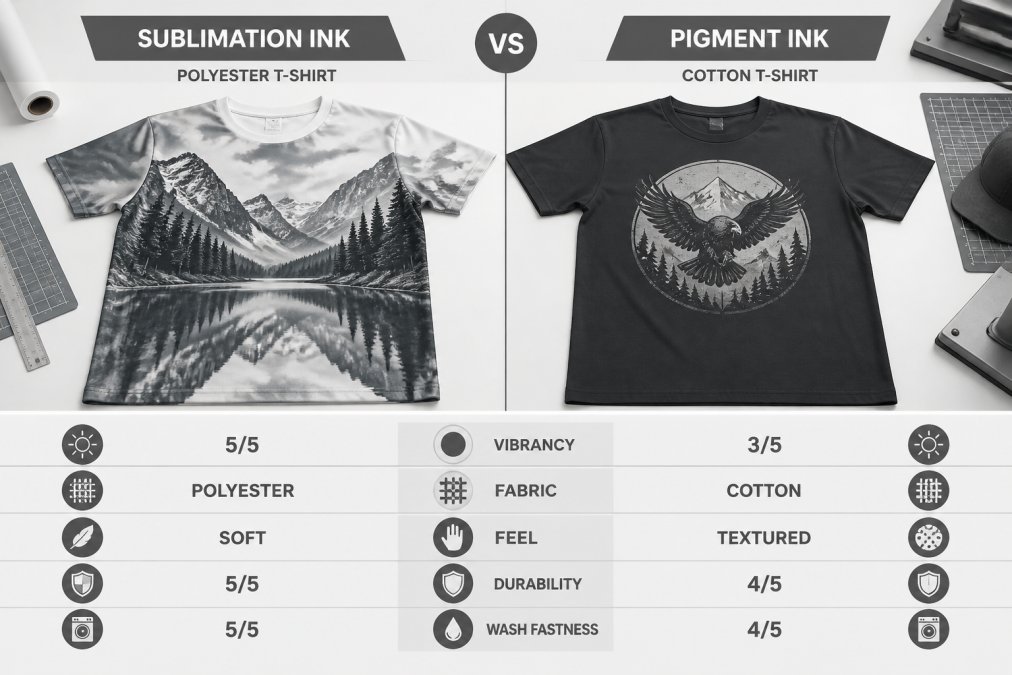
The common mistake is trying to use sublimation ink on a cotton shirt. The dye has no polyester fiber to bond with, so the print washes out after one or two cycles. No amount of heat or pressure fixes this, it's a chemistry problem.
How to Convert an Epson Printer to Sublimation
Converting an Epson printer to sublimation is one of the most cost-effective ways to enter the sublimation market. The process works because Epson's piezoelectric printhead technology is compatible with sublimation ink's viscosity and particle size. As documented in Epson's printhead technology overview, piezoelectric heads push ink mechanically rather than heating it, making them compatible with a wider range of ink chemistries.
The conversion process for an Epson EcoTank or compatible model:
- Start with a new or nearly new printer to minimize residual OEM ink
- Run multiple cleaning cycles with a dedicated flush solution to clear existing ink from the lines and printhead
- Fill the tanks or cartridges with sublimation ink, ensuring CMYK channels are loaded correctly
- Run additional cleaning cycles until output is free of color contamination
- Print a test pattern on transfer paper and check for color accuracy and nozzle dropout
- Calibrate color profiles for your specific ink and substrate combination
Post-Processing Requirements After Conversion
After converting to sublimation, every print requires a heat press for the thermal transfer step. Air-drying sublimation output produces no usable result, the dye only migrates into the substrate under heat and pressure.
Post-processing requirements include a heat press set to 190-210°C, consistent pressure across the full platen, accurate timing (45-60 seconds for most substrates), a protective parchment or Teflon sheet to prevent scorching, and allowing the substrate to cool before peeling transfer paper.
A converted printer dedicated exclusively to sublimation is the cleanest workflow. Switching back and forth between sublimation and standard inks requires full flushes each time and significantly increases contamination risk.
Maintenance Requirements for Sublimation Printers
Sublimation printers generally require less intensive maintenance than pigment setups because the dye-based solution has lower viscosity and smaller particle size, reducing nozzle clogging risk. According to Epson's official printer maintenance guidelines, regular nozzle checks and cleaning cycles are essential for maintaining print resolution and printhead longevity.
Core maintenance tasks include running a nozzle check before every production session, printing at least a small test pattern every 2-3 days if the printer is not in daily use, keeping the printer in a dust-free environment, monitoring ink levels and refilling before running completely dry, and storing sublimation ink away from direct light and heat.
Troubleshooting Common Print Failures
Washed-out or faded color after pressing: The most common cause is insufficient heat press temperature or time. Verify the press is reaching the target temperature with a calibrated thermometer. Increase press time in 5-second increments until saturation improves.
Banding or missing nozzles: Run a nozzle check pattern. If nozzles are missing, run 2-3 cleaning cycles and recheck. Persistent banding may indicate a partially clogged printhead requiring professional service.
Color shift or unexpected hue: Check for ink contamination in the lines (common after conversion or ink brand change). Verify that color profiles are correctly assigned to your specific ink and substrate combination.
Color migration after pressing: Ghosting or color bleed around design edges is caused by transfer paper shifting during pressing or pressing at too high a temperature for too long. Use heat-resistant tape to secure transfer paper before pressing.
Ink not bonding to substrate: Confirm the substrate contains sufficient polyester content. Sublimation ink will not bond to natural fibers or uncoated surfaces regardless of press temperature or time.
For print shops running Epson SureColor F-Series or T-Series hardware, Printer Ink Pro stocks compatible sublimation inks with replacement chips for many models, including older hardware that other providers no longer support. The Dye Sublimation Ink 4 color for Epson SureColor F6070 F7070 F7170 and the 5 1000ml bottles for Epson SureColor T3270 T5270 T7270 are engineered to deliver vibrant, long-lasting results, ensuring your equipment operates at peak performance.

For shops that prefer pre-filled cartridges over bulk ink systems, the Dye Sublimation Ink filled T694 Cartridges for Epson SureColor T3270 T5270 T7270 include chips pre-installed, eliminating the chip reset step that trips up many shops switching from OEM supplies.
For sustainability considerations, the EPA's Safer Choice program for ink and coating formulations provides certification standards for water-based ink systems, relevant for print shops evaluating the environmental profile of their sublimation or pigment ink supply chain.
The decision between dye sublimation ink vs pigment ink comes down to substrate, not preference. Polyester and coated hard goods belong with sublimation; paper, canvas, and natural fibers belong with pigment. Printer Ink Pro carries compatible sublimation ink solutions for Epson SureColor F-Series and T-Series printers, along with replacement chips and maintenance components for both current and older models. Get started with Printer Ink Pro and keep your production running with inks engineered for your specific hardware, no guesswork, no compatibility surprises.
Frequently Asked Questions
What are the main disadvantages of dye sublimation ink?
Dye sublimation ink only bonds with polyester fibers and polymer-coated substrates. It produces no visible results on cotton, natural fabrics, or uncoated surfaces. The process requires a heat press, transfer paper, and precise temperature control, adding equipment costs. Color migration can also occur if finished goods are stored near heat sources after printing. For shops printing on mixed fabric types, this substrate restriction is the biggest practical limitation.
Can I replace dye ink with pigment ink in the same printer?
Switching ink chemistry in the same printer is not straightforward. Sublimation ink and pigment ink have different viscosities and chemical compositions. Running pigment ink through a printer set up for sublimation, or vice versa, risks nozzle clogging, printhead damage, and color contamination. A full flush with the correct cleaning solution is required before switching, and many printer manufacturers recommend dedicated hardware for each ink type to protect printhead longevity.
Which ink type is better for printing on cotton versus polyester?
Pigment ink is the correct choice for cotton. It adheres to absorbent fibers through surface adhesion and produces durable, wash-resistant results on natural fabrics when combined with a proper pretreatment and curing process. Dye sublimation ink is engineered exclusively for synthetic fibers, primarily polyester. On cotton, sublimation ink produces washed-out, faded results because the dye-based solution has no polyester structure to bond with during the thermal transfer process.
Does Epson make printers that support both ink types?
Epson produces dedicated printers for each chemistry. The SureColor F-series (F6070, F7070, F6200, F7200, F6370, F9470) are purpose-built sublimation printers. The SureColor P-series uses UltraChrome pigment inks for fine art and photo output. No single Epson model officially supports both chemistries simultaneously. Attempting to run sublimation ink through a pigment-optimized printhead, or the reverse, risks permanent hardware damage and voids the manufacturer warranty.
How long do sublimation prints last compared to pigment ink prints?
Both ink types offer strong longevity when used correctly. Sublimation prints on polyester garments resist cracking, peeling, and fading through repeated washing because the dye infuses into the fiber rather than sitting on the surface. Pigment ink prints on fine art media or coated paper offer archival quality, with UV resistance that can preserve color fidelity for decades under proper display conditions. The substrate and storage environment matter as much as the ink chemistry itself.
This article was written using GrandRanker